
Buying a Telegram channel can feel like a shortcut to instant reach—an existing audience, active posts, and a ready-made brand. But it also comes with serious security risks. Ownership transfers can be messy, hidden admins may still have access, and one weak setting can let the previous owner (or a scammer) regain control. The goal is simple: take clean control, remove leftover access, and lock the channel down for the long term.
Step 1: Secure Your Telegram Account First (Before Touching the Channel)
Before you change anything inside the channel, make sure your own Telegram account is protected, because the channel’s security depends on it.
Actions:
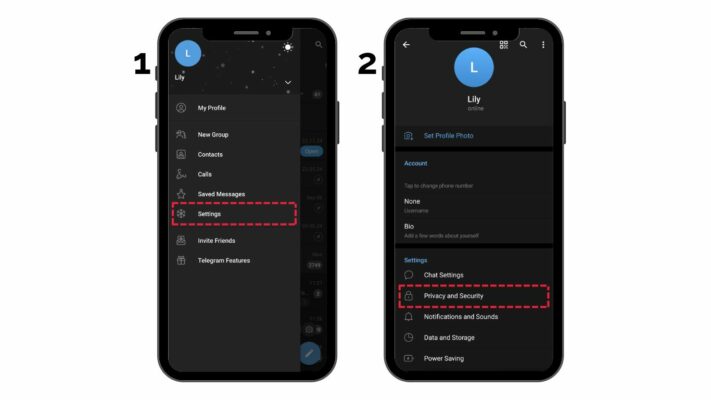
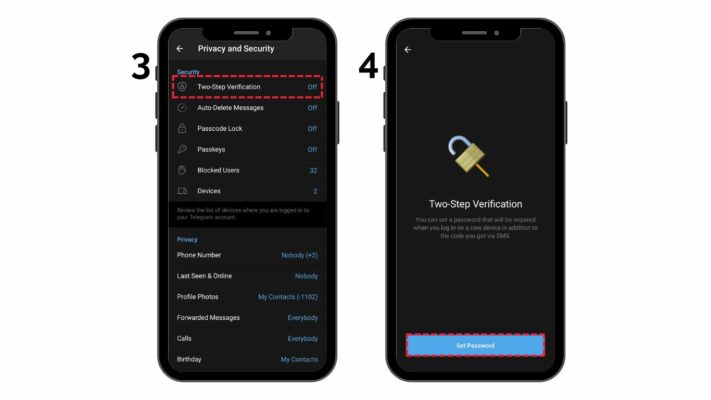
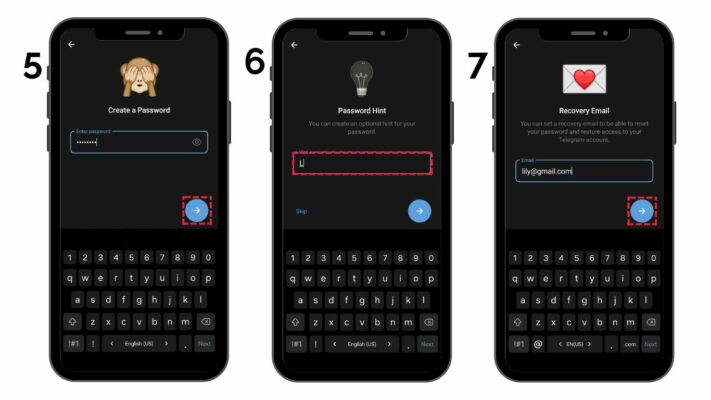
- Enable Two-Step Verification (Telegram Password)
- Go to: Telegram Settings > Privacy and Security > Two-Step Verification
- Set a strong password (different from your other accounts).
- Add a recovery email you fully control.
- Review Active Sessions
- Go to: Settings > Devices
- Log out of any session you don’t recognize.
- Keep only the devices you use.
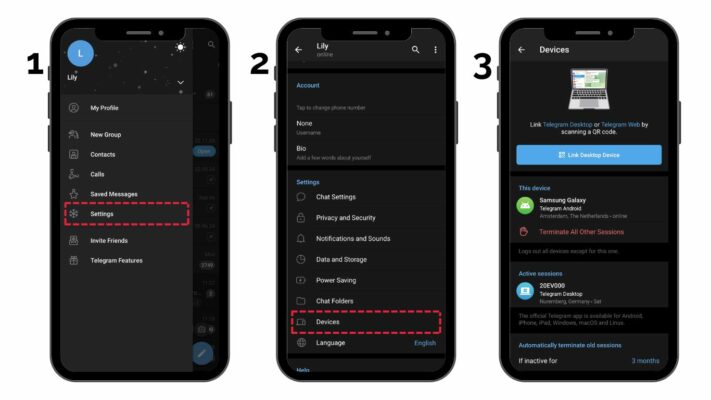
- Lock Your SIM / Number
- If your phone number gets hijacked (SIM swap), your Telegram can be at risk.
- Use a SIM PIN and make sure your mobile account has extra protection.
Important: Do not rush and change multiple things at once. First secure your Telegram account, then move to channel permissions.
Step 2: Get Admin Access the Safe Way (Make Yourself Admin First)
Your first priority after purchase is ensuring you have reliable admin access before removing anyone else. Many people lose channels by removing the wrong admin too early.
How to do it:
- Open the channel > tap the channel name at the top.
- Go to Administrators.
- Add your Telegram account as an Administrator (if you aren’t already).
- Give yourself the permissions you actually need, such as:
- Add admins
- Change channel info
- Post messages
- Delete messages
- Manage stories (if available)
If the seller insists on “temporary admin” access only, treat it as a risk. Without full admin rights, you can be removed anytime.
Step 3: Remove All Old Access (Hidden Admins, Bots, and Linked Groups)
This is where most takeovers happen—because buyers forget that access can exist in multiple places.
Actions:
- Review Every Admin One by One
- Go to Channel > Administrators
- Remove anyone you don’t fully control.
- Watch for suspicious accounts (random usernames, “support” accounts, inactive profiles).
- Check for Bots
- Go to Subscribers / Members (or manage list) and look for bots.
- If a bot has admin access, remove it unless you personally added it and trust it.
- Bots can be used to repost, delete, or quietly redirect traffic.
- Check Linked Discussion Group (If Connected)
- Many channels have a linked group for comments.
- Go to Channel Settings > Discussion
- Open the linked group and review:
- Group admins
- Bots
- Permissions
- Remove old admins there too—because a compromised discussion group can be used to attack your community.
Step 4: Lock Down Channel Settings (Name, Links, and Posting Control)
After removing old access, stabilize the channel identity so no one can confuse your audience—or claim it later.
Actions:
- Update Channel Ownership Signals
- Change:
- Channel description
- Contact info (if listed)
- External links
- Make sure nothing points to the previous owner.
- Change:
- Secure Invite Links
- If the channel uses invite links, regenerate them if possible.
- Remove old public/private links that the seller may still have shared.
- Control Posting Permissions
- Keep posting permissions limited to only your trusted admin accounts.
- Avoid “too many admins” early on—smaller admin teams are safer.
Step 5: Protect Against Scams, Phishing, and Fake “Telegram Support”
Telegram channel buyers are targets. Once scammers notice a channel has value, they try to steal it through social tricks—not technical hacks.
Actions:
- Never Trust “Support” DMs
- Telegram does not randomly DM owners asking you to “verify” the channel.
- Never share codes, passwords, or screenshots of security settings.
- Avoid Downloading “Sponsor Briefs” or “Brand Contracts”
- Many takeovers start with a malicious file or link.
- Handle brand offers through official contact methods only.
- Watch for Sudden Unusual Activity
- Unexpected edits, deleted posts, new admins, or changed links.
- If anything feels off: immediately review Devices, Two-Step Verification, and Administrators.
Step 6: Final Steps for Long-Term Protection
Once everything is stable, set habits that keep the channel safe month after month.
Actions:
- Create a Security Schedule
- Weekly: check admins + session devices
- Monthly: update passwords and review connected tools/bots
- Keep Backup Control
- Use a dedicated recovery email for Telegram 2SV.
- Store recovery details safely (password manager recommended).
- Limit Admin Count & Use Trusted Roles
- Only assign admin rights to people you trust deeply.
- Give minimal permissions to helpers (e.g., allow posting but not adding admins).
Protect Your Telegram Investment
When you buy a Telegram channel, you aren’t just buying subscribers—you’re buying a digital asset that can be taken back if security isn’t handled carefully. Follow a slow, controlled transfer process: secure your Telegram account first, confirm full admin rights, remove leftover access, lock down bots and links, and stay alert for scams.
Remember: Telegram security isn’t one-and-done. Stay proactive, review access regularly, and your channel will remain yours—secure and stable for the long run.