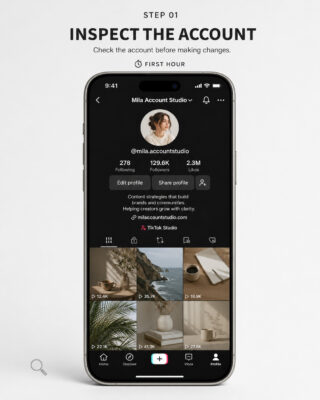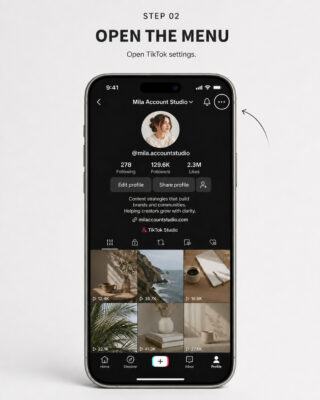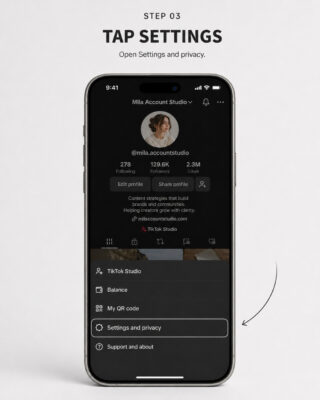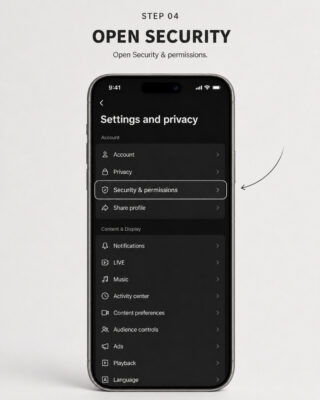
Remember, securing your TikTok account is only part of the job — you should also make sure your email is protected. Check out the article “How to Secure Your Email?” for practical tips.
A staged seven-day security-transfer procedure for Buyers and Sellers
SEBUDA
Operational Security Guidance
Prepared August 2026
Before Making Any Security Changes
Please read the following instructions carefully before modifying the delivered TikTok account.
IMPORTANT – ONE-HOUR INSPECTION: After the Seller delivers the account, the Buyer has one (1) hour to inspect it and decide whether to proceed. During this period, the Buyer may only verify that the account matches the listing and functions as described. The Buyer must not change the password, email address, phone number, username, profile information, linked accounts, security settings, or account content. If the Buyer decides not to proceed, the Sebuda Admin Team must be notified through the website chat before any modification is made.
DO NOT MODIFY CONTENT: During the inspection period, the Buyer must not delete, hide, publish, edit, archive, or otherwise modify videos, drafts, messages, profile information, linked services, or any other account content.
AVOID RAPID MAJOR CHANGES: After accepting the account, avoid making several significant changes in a short period. Rapid changes to contact information, password, username, profile, account region, linked services, security settings, or content may be interpreted by TikTok’s automated systems as unusual activity. Mass deletion, mass following or unfollowing, frequent device changes, automation tools, and unstable VPN locations may also cause security challenges, restrictions, verification requests, or suspension.
Sebuda accepts no responsibility for restrictions, verification requests, suspensions, loss of access, or permanent bans resulting from the Buyer’s failure to follow these recommendations.
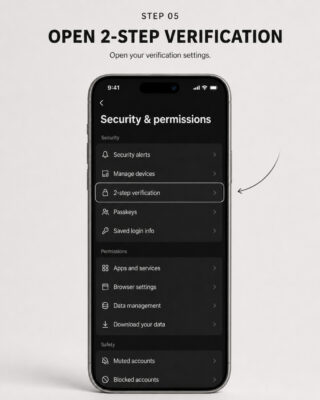
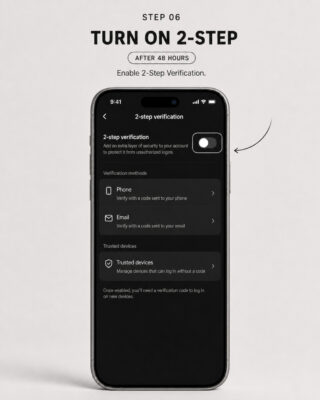
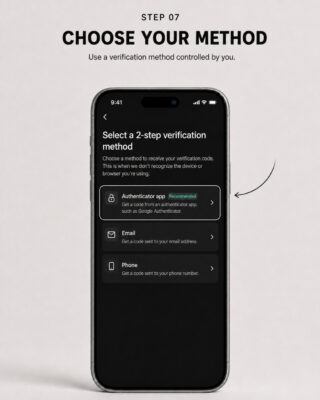
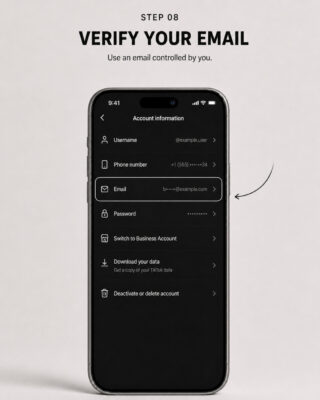
The visual guides for the tutorials are provided at the end of the article.
Seven-Day Timeline at a Glance
The Buyer and Seller must choose one of the two procedures below. The methods are alternatives and should not be combined unless instructed by the Sebuda Admin Team.
| Time | Method One | Method Two |
|---|---|---|
| Inspection | Inspect only; no account changes. | Inspect only; no account changes. |
| Immediately after acceptance | Seller adds and verifies the Buyer’s phone number and email address. | Seller provides access without changing account information. |
| First 48 hours | Buyer maintains a stable login environment and makes no additional major changes. | Buyer maintains a stable login environment and does not change contact information. |
| After 48 hours | Buyer changes the TikTok password. | Buyer changes and verifies the TikTok email address and phone number. |
| After 72 hours | Continue monitoring; avoid unnecessary major changes. | Buyer changes the TikTok password. |
| Day Six | Complete legitimate TikTok identity/security verification requests, if presented. | Complete legitimate TikTok identity/security verification requests, if presented. |
| Day Six or Seven | Enable 2-Step Verification and complete the final security review. | Enable 2-Step Verification and complete the final security review. |
| By end of Day Seven | Change the password again and remove all unknown devices and access methods. | Change the password again and remove all unknown devices and access methods. |
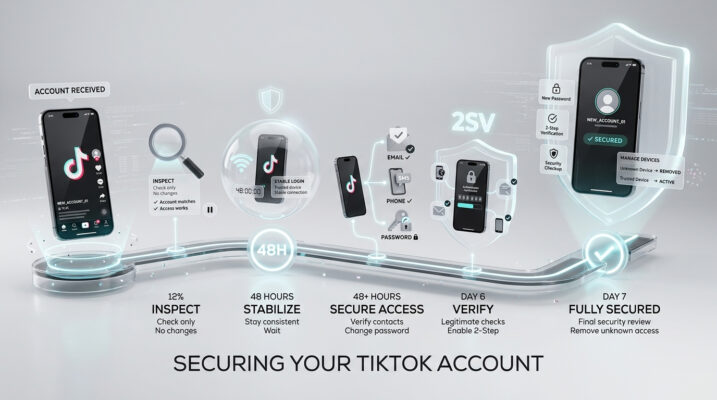
Method One: Seller-Assisted Contact Information Change
Recommended when the Buyer wants the account’s email address and phone number changed as soon as possible. Under this method, the Seller makes the initial contact-information changes. The Buyer must not independently make additional security changes during the initial transfer.
1. Be Online Together
The Buyer and Seller should remain online simultaneously throughout the initial security-transfer process. This allows verification codes and unexpected security warnings to be handled immediately.
- Verification codes should be provided without unnecessary delay.
- Email and phone-number changes should be confirmed immediately.
- Failed verification attempts should be identified and documented.
- Unexpected warnings should be reported to the Sebuda Admin Team.
- All necessary communication should remain in the Sebuda transaction chat.
2. Add the Buyer’s Phone Number
The Buyer should provide a personal phone number to the Seller. The Seller should add or replace the number connected to the TikTok account. The Buyer must receive the verification code directly and confirm that the number has been successfully verified.
- The phone number should belong exclusively to the Buyer.
- It must be capable of receiving TikTok verification messages.
- It should not be connected to an excessive number of TikTok accounts.
- The Buyer should protect the mobile account against SIM-swap or unauthorized replacement.
- The Seller’s previous phone number must not remain connected after successful replacement.
3. Add the Buyer’s Email Address
The Buyer should provide a secure email address to the Seller. The Seller should connect it to the TikTok account and complete TikTok’s required verification steps.
- Confirm that the correct email address was entered.
- Confirm receipt of the TikTok verification message.
- Confirm that the email address is fully verified.
- Confirm that the Seller’s previous email address is no longer connected.
- Protect the email account with its own unique password and two-factor authentication.
4. Review the Updated Contact Information
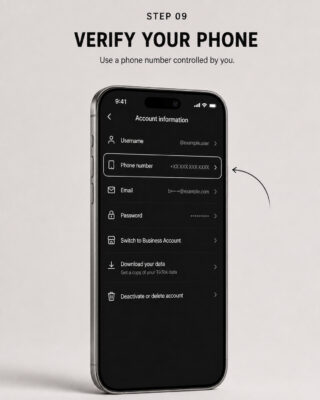
Review the information through: Profile > Menu > Settings and privacy > Account > Account information.
Confirm that the new email address and phone number are displayed correctly. At this stage, do not make unnecessary changes to the username, profile, content, region, password, linked services, or other settings.
5. Wait Until 48 Hours Have Passed
After the Buyer’s email address and phone number have been successfully added, allow 48 complete hours to pass before changing the TikTok password.
- Use only a consistent and trusted device.
- Avoid VPNs or frequently changing IP addresses.
- Avoid simultaneous logins from several devices.
- Do not change the username, account region, or major profile details.
- Do not delete or edit large amounts of content.
- Do not mass-follow or mass-unfollow users.
- Do not connect third-party automation tools.
- Monitor the account for security notifications.
CLARIFICATION: The 48-hour waiting period is an operational recommendation developed by Sebuda. It is not represented as an official TikTok requirement or guarantee.
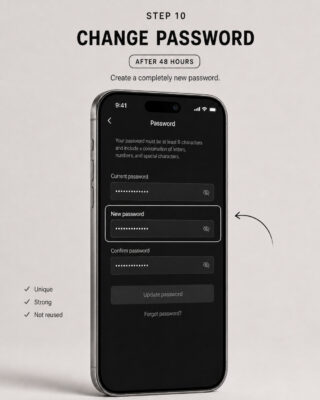
6. Change the TikTok Password After 48 Hours
Once 48 complete hours have passed, the Buyer should change the TikTok password. The new password should:
- contain approximately 12 to 15 characters;
- include uppercase and lowercase letters, numbers, and symbols;
- be completely different from the previous password;
- not be reused for the Buyer’s email or other accounts; and
- be stored securely in a reputable password manager.
After changing the password, confirm that access remains available through the connected email address and phone number. TikTok states that changing the password signs the account out of other devices, so the Buyer should be prepared to sign in again and complete any legitimate verification request.
7. Complete Legitimate Verification Requests on Day Six
On Day Six, review whether TikTok has presented any legitimate identity, age, security, payment, business, monetization, or account-ownership verification request.
- Use only the official TikTok application or website.
- Respond only when TikTok has genuinely requested verification.
- Use accurate, legally valid information.
- Use the Buyer’s own information and documents only where TikTok permits it.
- Proceed only when the Buyer is legally eligible to complete the verification.
PROHIBITED: The Buyer must never submit false, altered, borrowed, or misleading documents; impersonate the Seller or another person; attempt to bypass TikTok’s verification systems; or overwrite existing financial or legal identity information without confirming that TikTok permits the change.
If the account contains TikTok Shop, LIVE monetization, Creator Rewards, advertising, payment, tax, or business-verification information belonging to the Seller, contact the Sebuda Admin Team before changing or submitting identity-related information.
8. Enable Two-Step Verification on Day Six or Seven
On Day Six or Day Seven, enable TikTok’s Two-Step Verification (2SV) through: Profile > Menu > Settings and privacy > Security & permissions > 2-step verification.
Select at least two methods fully controlled by the Buyer. Where available, use:
- an authenticator application;
- the Buyer’s verified email address; and
- the Buyer’s verified phone number.
The authenticator application must be installed only on the Buyer’s trusted device.
9. Change the Password Again on Day Seven
After enabling Two-Step Verification, change the TikTok password again on Day Seven. The final password must be unique, different from all previously used passwords, unknown to the Seller or any third party, and securely stored by the Buyer.
OPERATIONAL RECOMMENDATION: This final password rotation is recommended by Sebuda based on operational experience. It is not an official TikTok requirement or a guarantee against future reviews or recovery attempts.
Method Two: Buyer-Managed Contact Information Change
Recommended when the Buyer prefers to change the email address and phone number personally. Under this method, the Seller provides access without changing the account’s contact information, and the Buyer follows the staged timeline below.
1. Seller Provides Access Without Making Changes
The Seller should log in to the TikTok account for the Buyer and provide access in accordance with the transaction procedure. During this step, the Seller must not:
- change the email address or phone number;
- change the password;
- enable or disable Two-Step Verification;
- add a passkey;
- modify the username, profile, account region, or content;
- connect new applications or services; or
- make any other unnecessary modification.
The Buyer must confirm that access has been received and that the account matches the listing.
2. Maintain a Stable Login Environment for 48 Hours
For the first 48 hours, the Buyer should use the account only from one trusted device and a stable internet connection.
- Avoid frequent logins and logouts.
- Avoid switching between several devices.
- Avoid unstable proxies or frequently changing VPN locations.
- Avoid unnecessary region or device-language changes.
- Avoid mass following, unfollowing, deletion, or content editing.
- Do not change the username, biography, profile photo, or display name.
- Do not connect automation or unknown third-party applications.
After delivery, the Seller must not access, modify, recover, or interfere with the account except where assistance is requested through the Sebuda transaction chat.
3. Change the Email and Phone Number After 48 Hours
After 48 complete hours have passed from the initial login, the Buyer should change the contact information connected to the TikTok account.
- Add and verify the Buyer’s personal email address.
- Add and verify the Buyer’s personal phone number.
- Confirm receipt of both verification codes.
- Confirm that the new email and phone number appear correctly in Account Information.
- Remove the Seller’s former contact information where TikTok permits it.
- Avoid making other major profile or security changes at the same time.
STOP AND REPORT: If TikTok displays an unfamiliar error, security lock, recovery warning, or unexpected verification request, stop making changes and contact the Sebuda Admin Team immediately.
4. Change the TikTok Password After 72 Hours
After 72 complete hours have passed from the initial login, the Buyer should change the TikTok password. The password must be completely new, unique, and unavailable to the Seller.
- Confirm that the new email address works.
- Confirm that the new phone number works.
- Confirm that the Buyer can sign in successfully.
- Confirm that no unfamiliar verification method appears.
- Check for unexpected recovery notifications.
5. Complete Legitimate Verification Requests on Day Six
On Day Six, review and complete only legitimate identity or security-verification requests officially presented by TikTok. Use accurate information through TikTok’s official interface.
If the account contains existing age, identity, tax, payment, TikTok Shop, business, or monetization information belonging to the Seller, do not overwrite or misrepresent it. Contact the Sebuda Admin Team whenever the permitted procedure is unclear.
6. Enable Two-Step Verification on Day Six or Seven
Activate Two-Step Verification using at least two methods controlled exclusively by the Buyer. The preferred combination is an authenticator application, verified email address, and verified phone number.
Where supported, the Buyer may also add a passkey. It must be stored only in the Buyer’s personal Apple ID, Google Account, or password manager.
7. Change the Password Again by the End of Day Seven
Immediately after enabling Two-Step Verification, or no later than the end of Day Seven, change the TikTok password again. The final password must never have been previously used or shared.
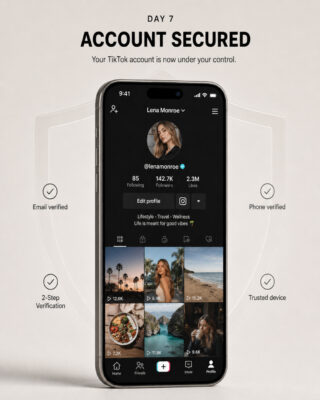
Final Security Review on Day Seven
Regardless of the selected method, complete every review below by the end of Day Seven.
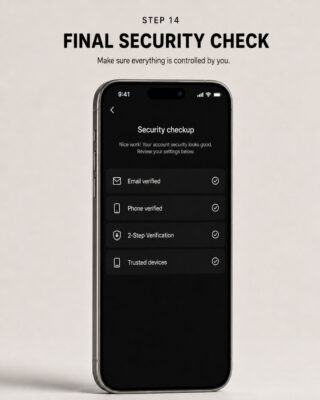
Security Checkup
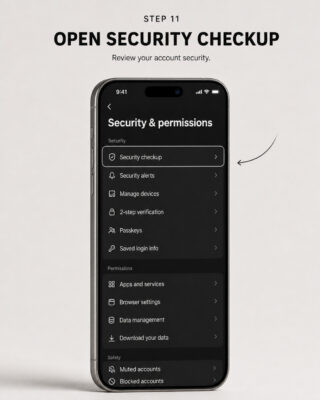
Navigate to: Profile > Menu > Settings and privacy > Security & permissions > Security checkup.
- The Buyer’s phone number is linked and verified.
- The Buyer’s email address is linked and verified.
- Two-Step Verification is enabled.
- The Buyer’s verification methods are working.
- No verification method belonging to the Seller remains connected.
- No unusual security activity is displayed.
- A Buyer-controlled passkey has been added where supported.
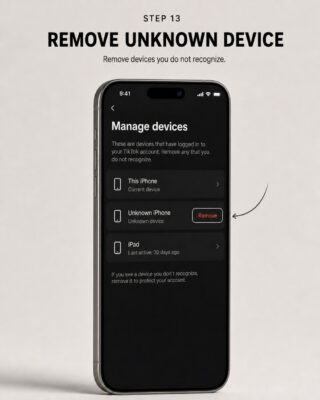
Manage Devices
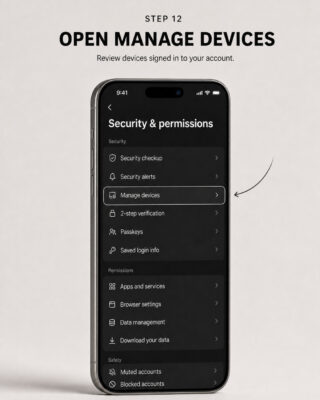
Navigate to: Settings and privacy > Security & permissions > Manage devices.
- Review every listed device.
- Remove every device that does not belong to the Buyer.
- Confirm that only trusted Buyer-controlled devices remain.
- Change the password again if an unknown device reappears.
Connected Services
Review and remove unauthorized or Seller-controlled access involving:
- Google, Apple, or Facebook login methods;
- TikTok Business Center or Ads Manager;
- TikTok Shop;
- third-party applications;
- content-management or analytics services; and
- automation services.
LINKED LOGIN WARNING: If the account was created through a Google, Apple, Facebook, or other external login belonging to the Seller, changing the TikTok email address and password may not be sufficient. The linked login method must also be legitimately removed or transferred where TikTok permits it.
Account Status
Review the account status through TikTok Studio or the Safety Center. Check for restrictions affecting login, posting, comments, profile editing, or direct messages.
Important Limitations
The timelines in this guide are precautionary procedures developed by Sebuda based on operational experience. TikTok does not officially guarantee that waiting 48 hours, 72 hours, or seven days will prevent security reviews, recovery requests, restrictions, or suspension.
- No security procedure can guarantee that an account will never be recovered, restricted, or suspended.
- The Buyer must comply with TikTok’s applicable rules and verification requirements.
- The Buyer must never provide false information or impersonate another person.
- TikTok may request additional verification based on device, location, account history, monetization status, or other security signals.
- Sebuda cannot override TikTok’s systems or guarantee the outcome of a recovery or verification review.
- Suspicious activity, recovery requests, unknown devices, or verification problems must be reported to the Sebuda Admin Team immediately.
Official TikTok References
- Account Safety: https://support.tiktok.com/en/safety-hc/account-and-user-safety/account-safety
- Reset Password: https://support.tiktok.com/en/log-in-troubleshoot/log-in/reset-password
- Account Status: https://support.tiktok.com/en/safety-hc/account-and-user-safety/account-status
FINAL REMINDER: Complete only the steps applicable to the selected transfer method. Do not rush changes, do not submit inaccurate identity information, and contact the Sebuda Admin Team before proceeding whenever TikTok presents an unexpected security or verification request.
These menus are shown on the iOS operating system. Please note that the menu options and their layout may vary depending on the operating system, device model, or software version.