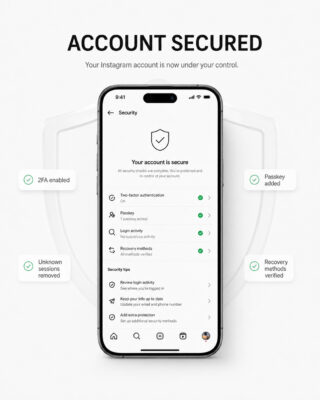
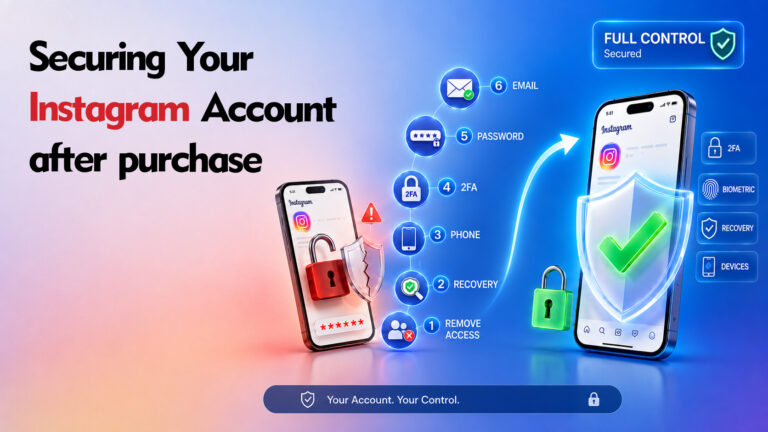
Remember, securing your Instagram account is only part of the job; you should also make sure your email is protected. Check out the article “How to Secure Your Email?” for practical tips.
A staged 24/48/72-hour security procedure for Buyers and Sellers
Before Making Any Security Changes
Please read the following instructions carefully before modifying the delivered Instagram account.
IMPORTANT – ONE-HOUR INSPECTION: After the Seller delivers the account, the Buyer has one (1) hour to inspect it and decide whether to proceed with the purchase. During this period, the Buyer must not change the password, email address, phone number, username, profile information, security settings, or any account content. The inspection period is solely for verifying that the account matches the listing and functions as described. If the Buyer decides not to proceed, the Sebuda Admin Team must be notified before any modification is made.
DO NOT MODIFY CONTENT: During the inspection period, the Buyer must not delete, archive, publish, edit, or otherwise modify posts, reels, stories, profile information, messages, or any other account content.
AVOID RAPID MAJOR CHANGES: After accepting the account, avoid making several major changes within a short period. This includes changing the username, profile photo, biography, display name, email address, or phone number; deleting a large number of posts or reels; mass unfollowing users; or performing other unusual activity. Instagram’s automated security systems may interpret this behavior as suspicious and may apply restrictions, verification requests, or account suspension.
Sebuda accepts no responsibility for account restrictions, suspensions, or permanent bans resulting from the Buyer’s failure to follow these recommendations.
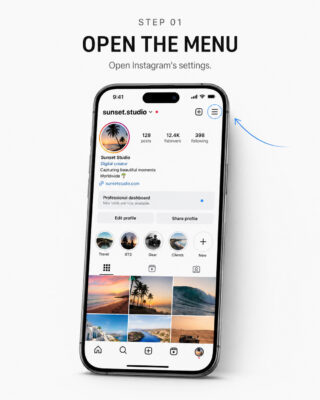
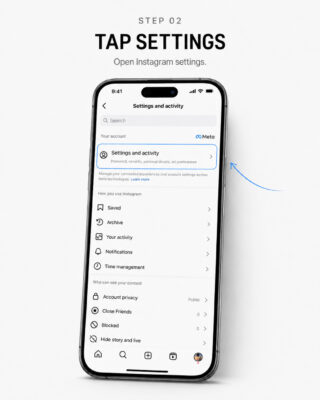
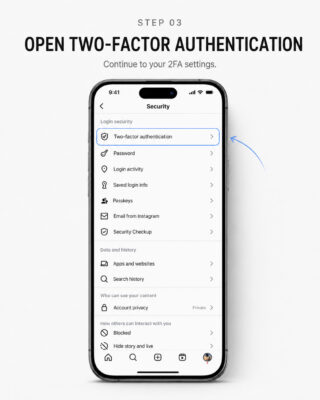
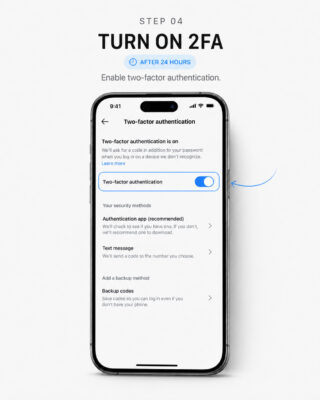
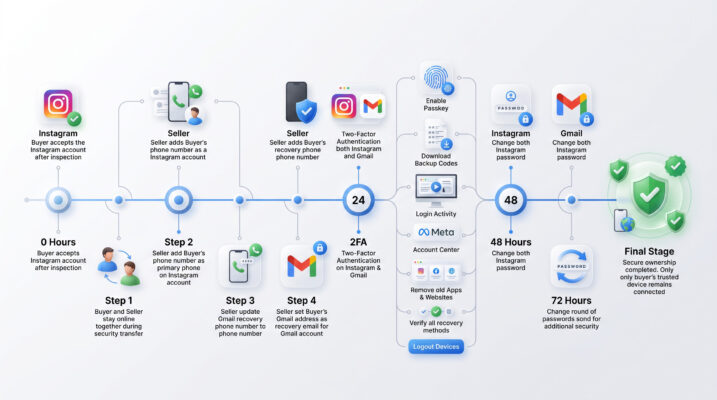
The visual guides for the tutorials are provided at the end of the article.
Security Timeline at a Glance
| Stage | Timing | Required Action |
|---|---|---|
| Inspection period | First 1 hour | Inspect only. Do not modify the account. |
| Initial transfer | After acceptance | Buyer and Seller remain online; Seller adds the Buyer’s phone number and configures the email recovery methods. |
| 2FA setup | After 24 hours | Enable 2FA on the Instagram account and its associated email account. |
| First password rotation | After 48 hours | Change the Instagram password and the associated email password. |
| Second password rotation | After 72 hours | Change both passwords again and complete the final security review. |
Recommended Account Security Procedure
Once the Buyer has accepted the account and the inspection period has ended, Sebuda recommends completing the following steps in order.
1. Be Online Together
The Buyer and Seller should be online at the same time throughout the security-transfer process so that all security-related changes can be completed smoothly and verified immediately.
2. Add the Buyer’s Phone Number to Instagram
The Buyer should provide a personal phone number to the Seller. The Seller should add the Buyer’s phone number to the Instagram account as its primary phone number.
Recommendations
- The phone number should belong exclusively to the Buyer.
- The number should be capable of receiving SMS messages or verification calls from Instagram.
- Sebuda recommends using a phone number that has not previously been associated with a large number of Instagram accounts.
3. Configure the Buyer’s Recovery Phone for the Email Account
The Seller should configure the Buyer’s phone number as the recovery phone number for the email account associated with the Instagram account.
This helps ensure that the Buyer can recover access to the email account if necessary and reduces the risk of unauthorized recovery attempts by previous owners.
RECOMMENDATION: Before completing the transaction, the Buyer should verify that the recovery phone number has been successfully updated and that no previous recovery phone number belonging to the Seller remains associated with the email account.
4. Configure the Recovery Email
The Buyer should provide a preferred recovery email address to the Seller. Where supported by the email provider, the Seller should configure the Buyer’s address as the recovery email for the email account associated with Instagram.
ORIGINAL EMAIL (OG EMAIL): If the account is transferred together with its Original Email, Sebuda recommends that the email address connected to the Instagram account should not be changed unless absolutely necessary. Maintaining the original email history may reduce the likelihood of triggering Instagram’s automated security reviews.
5. Enable Two-Factor Authentication After 24 Hours
After 24 hours have passed since the initial login, the Buyer should enable Two-Factor Authentication (2FA) on both the Instagram account and its associated email account.
6. Complete Additional Security Settings
Immediately after enabling 2FA, the Buyer should complete the following security measures:
- Enable Passkey, if supported by the device and Instagram.
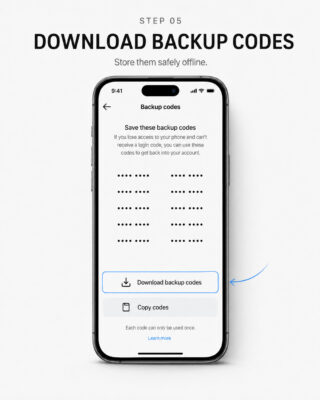
- Download and securely store all Backup Codes (Recovery Codes) in a safe offline location.
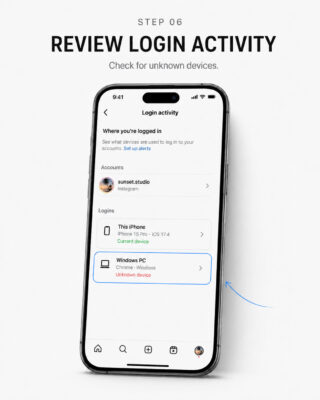
- Review Login Activity and ensure that no unknown devices or active sessions remain connected.
- Review Meta Account Center and confirm that no Facebook account, Threads account, or other Meta service belonging to the Seller remains connected.
- Review Apps and Websites and remove third-party applications or services that are no longer required or that belong to the Seller.
- Verify that no previous recovery method belonging to the Seller remains associated with the account, including recovery email addresses or phone numbers.
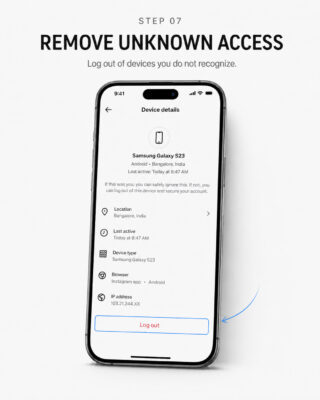
- After completing all security checks, sign out all other active sessions and ensure that only the Buyer’s own devices remain logged in.
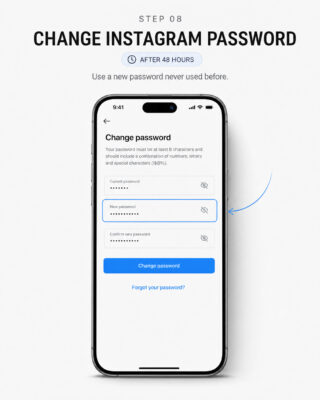
7. Change Both Passwords After 48 Hours
After another 24 hours have passed – 48 hours after the initial login – the Buyer should change:
- the Instagram account password; and
- the password of the associated email account.
8. Change Both Passwords Again After 72 Hours
After another 24 hours have passed – 72 hours after the initial login – the Buyer should change both passwords once again:
- the Instagram account password; and
- the password of the associated email account.
OPERATIONAL RECOMMENDATION: This additional password rotation is recommended by Sebuda based on its operational experience and may further strengthen the security of the transferred account.
Final Security Review
After completing the 72-hour procedure, the Buyer should confirm every item below.
Instagram Account
- The Buyer’s phone number is connected and verified.
- Two-Factor Authentication is enabled.
- Passkey is enabled where supported.
- Backup Codes have been downloaded and stored offline.
- Only the Buyer’s trusted devices remain in Login Activity.
- No Seller-controlled Facebook, Threads, or Meta account remains connected.
- No unknown third-party application or website remains authorized.
Associated Email Account
- The Buyer’s phone number is configured as the recovery phone.
- The Buyer’s preferred email address is configured as the recovery email where supported.
- No Seller-controlled recovery phone number or recovery email remains connected.
- Two-Factor Authentication is enabled on the email account.
- The email password has been changed according to the 48-hour and 72-hour schedule.
Important Limitations
The 24-hour, 48-hour, and 72-hour schedule in this guide is an operational procedure recommended by Sebuda. It is not represented as an official Instagram requirement or as a guarantee against security reviews, restrictions, recovery attempts, or suspension.
- No security procedure can guarantee that an account will never be recovered, restricted, or suspended.
- The Buyer must comply with Instagram’s applicable rules and verification requirements.
- Sebuda cannot override Instagram or Meta security systems.
- Unexpected security warnings, unknown sessions, or verification problems should be reported to the Sebuda Admin Team immediately.
FINAL REMINDER: Complete the steps in order, avoid several major changes at once, retain the Original Email where appropriate, and ensure that every recovery method, active session, and linked service is controlled exclusively by the Buyer.
These menus are shown on the iOS operating system. Please note that the menu options and their layout may vary depending on the operating system, device model, or software version.