
Have you ever found an Instagram Reel that you wanted to save for later, keep for reference, or watch when you are offline?
Downloading Instagram Reels is much easier than it used to be. Instagram now provides a built-in download option for eligible public Reels, so in many cases you no longer need a third-party Instagram Reels downloader at all.
However, the official download option is not available for every Reel. Creators can disable downloads, private-account Reels cannot be downloaded through Instagram’s public download feature, and downloaded Reels may include an Instagram watermark. Licensed music can also affect the audio included in the downloaded file. These limitations were documented when Instagram expanded public Reel downloads, as reported by TechCrunch.
This guide explains how Instagram Reel downloads work in 2026, how to use Instagram’s own download feature, when you may need an online downloader, and which currently active tools are worth knowing about.
What Are Instagram Reels in 2026?
Instagram Reels are vertical video posts designed for discovering, creating, and sharing video content on Instagram.
Meta introduced Instagram Reels in 2020 as short 15-second videos, but Instagram has expanded the format significantly since then.
As of 2026, Instagram allows users to record and edit Reels up to 20 minutes long. However, current guidance indicates that Reels longer than three minutes are not recommended to new audiences. In other words, a longer Reel can still be published, but creators interested in reaching people who do not already follow them should pay attention to the three-minute recommendation threshold.
Reels can include features such as:
- Music and original audio
- Text and captions
- Effects and filters
- Multiple video clips
- Voiceovers
- Templates
- Stickers and other creative elements
Reels can appear in the Reels feed, Instagram Feed, Explore surfaces, profiles, and other recommendation areas depending on Instagram’s distribution systems.
Do You Still Need an Instagram Reels Downloader?
Not always.
One of the biggest changes since older Instagram Reel downloader guides were published is that Instagram now provides a native download feature for eligible public Reels.
Instagram began rolling out direct Reel downloads in 2023 and later expanded the feature globally. Users can download an eligible Reel directly from the Instagram app by opening the sharing options and selecting Download, according to TechCrunch.
This means you should generally check Instagram’s built-in download option before using a third-party website.
Third-party Reel downloaders can still be useful when:
- You want to save an eligible public Reel but the workflow you need is easier from a browser.
- You are using Instagram on a desktop computer.
- You want a downloadable MP4 from a supported public Reel.
- You want a service that does not add its own watermark.
- You need additional features such as downloading public photos, carousels, or other supported Instagram media.
Keep in mind that third-party services are independent of Instagram and their availability, features, URLs, and limitations can change over time.
How to Download Instagram Reels Directly from Instagram
For an eligible public Reel, Instagram provides the easiest method.
Step 1: Open the Reel
Open the Instagram app and go to the Reel you want to save.
Step 2: Tap Share
Tap the Share icon.
Step 3: Select Download
If the creator allows downloads and the Reel is eligible, you should see a Download option. Tap it to save the Reel to your device.
Instagram’s native downloads generally include an Instagram watermark and the creator’s username. Creators with public accounts can also disable Reel downloads, according to TechCrunch.
What Happens to the Audio?
There is an important limitation.
TechCrunch reported that when Instagram expanded Reel downloads, a Reel using licensed music may be downloaded without that licensed audio. Reels using eligible original audio may retain their sound.
Therefore, the downloaded version may not always be identical to the Reel you hear inside Instagram.
Why Is the Instagram Reel Download Button Missing?
If you open the sharing menu and cannot find Download, it does not necessarily mean something is wrong with your app. There are several possible reasons.
The Reel Comes from a Private Account
Instagram does not allow other users to use its public Reel-download feature for Reels from private accounts. Public Reel download guidance distinguishes private accounts from content that is eligible for public downloading.
The Creator Disabled Downloads
Public-account owners can control whether other users are allowed to download their Reels. If the creator turns the option off, the Download button may not be available. Instagram provides these download controls for public Reels.
The Reel Is Not Eligible for Download
Availability can also depend on the Reel and its settings. Instagram has changed its Reel download system over time, so older content or individual Reel settings may behave differently.
Remember that Save and Download are different. Saving a Reel bookmarks it inside Instagram so you can find it later. Downloading creates a video file on your device.
How Does an Online Instagram Reels Downloader Work?
Most browser-based Instagram Reels downloaders use a similar process.
Step 1: Copy the Reel URL
Open Instagram, find a public Reel and select Copy link from the sharing options.
Step 2: Open the Downloader
Open your preferred Instagram Reel downloader in a browser.
Step 3: Paste the URL
Paste the copied Instagram link into the downloader.
Step 4: Process the Reel
Select the download or processing button.
Step 5: Save the Available File
If the Reel is publicly accessible and supported by the service, the downloader should provide an available video file, commonly MP4.
A reputable public-content downloader should not require your Instagram password simply to process a public Reel URL.
Be cautious of websites that ask for Instagram login credentials, require unnecessary browser extensions, redirect repeatedly to unrelated pages, or claim that they can bypass the privacy settings of private accounts.
5 Instagram Reels Downloaders Available in 2026
Third-party downloading services frequently change. The following services had active Reel-downloading functionality during our 2026 review.
Their inclusion here describes currently advertised functionality rather than an endorsement or guarantee that every feature will remain available.
1. Inflact Instagram Reels Downloader

Inflact provides a dedicated web-based Instagram Reels downloader. The service supports publicly available Instagram content and allows users to paste a Reel URL into its downloader without signing into Instagram. Inflact also states that its downloader does not add its own watermark to the downloaded media.
Current features include:
- Public Instagram Reels
- Browser-based downloading
- No Instagram login required for individual public links
- Mobile and desktop support
- Reel and other public Instagram media support
- Limited free usage with additional paid functionality
- Bulk and cloud-storage features available separately
Inflact explicitly states that private-account downloading is not supported by its downloader. This makes the service clearer about privacy limitations than many Reel-download websites.
2. IGExport Reels Downloader
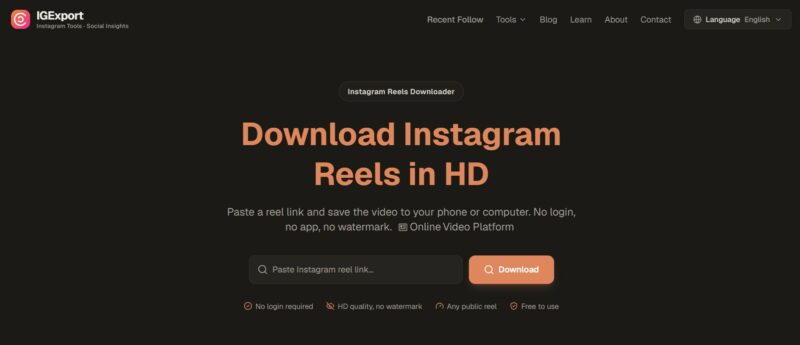
IGExport is another browser-based Reel downloader that was active during our 2026 review. The service allows users to paste a public Instagram Reel URL and states that no Instagram login or app installation is required. Its current documentation also limits its normal Reel-downloading functionality to public content.
Current features include:
- Public Reel URL support
- Browser-based downloading
- MP4 output
- No Instagram login required
- No app installation required
- No downloader-added watermark, according to the service
- Mobile and desktop browser compatibility
IGExport also offers additional ways to browse supported public Instagram content, but users should remember that its feature claims come from the service itself and may change.
3. FastDL

FastDL remains an active browser-based Instagram downloader in 2026. Its current Reel downloader accepts links to public Instagram Reels and provides supported video downloads in MP4 format. The service states that no Instagram account or app installation is required.
Current features include:
- Public Reel downloads
- MP4 output
- No software installation required
- Works through a web browser
- Support for phones and computers
- No Instagram account required for supported public content
One important correction to many older FastDL descriptions is that there is no reason to promise formats such as AVI or MOV for every Reel. The current Reel downloader primarily describes its downloadable video output as MP4.
4. SSSInstagram

SSSInstagram continues to operate an Instagram Reels downloader. The service uses the familiar copy-link-and-paste workflow and supports public Reel links through a web browser. Its current Reel page describes high-quality Reel video downloading without requiring Instagram login information.
Current features include:
- Instagram Reel downloads
- Browser-based use
- Video downloads
- Support for mobile devices
- No Instagram login required for supported public content
- Support for several other Instagram media types
As with any third-party tool, successful downloading depends on whether Instagram makes the public media accessible and whether the downloader remains compatible with Instagram’s current systems. No downloader should be described as working “without fail.”
5. Publer Media Downloader

Pbleur provides a broader social-media media downloader rather than an Instagram-only Reel downloader. Its downloader can process URLs from public social-media posts, including supported Instagram content. Publer also acknowledges that some Instagram media may not be downloadable because of privacy settings or platform restrictions.
Current features include:
- Support for public Instagram media
- Browser-based operation
- Support for multiple social platforms
- No need to manually install a dedicated Instagram downloader
- Desktop and mobile workflows
One advantage of Publer’s documentation is that it does not claim that every Instagram post can always be downloaded. The service explicitly acknowledges platform and privacy restrictions.
Instagram Reels Downloader Comparison
| Downloader | Public Reels | Instagram Login Required | Browser Based | Notes |
| Instagram Native Download | Yes, when enabled | Yes, through Instagram | App-based | Includes Instagram/creator watermark |
| Inflact | Yes | No for public links | Yes | Free usage is limited; additional tools available |
| IGExport | Yes | No | Yes | Focused on public Reel downloading |
| FastDL | Yes | No | Yes | Focused on simple link-to-MP4 downloading |
| SSSInstagram | Yes | No | Yes | Supports multiple Instagram media types |
| Publer | Supported public media | No for downloader workflow | Yes | Also supports other social platforms |
Because third-party services can change their policies and technical behavior at any time, check the service itself before relying on it for an important workflow.
Can You Download Instagram Reels Without a Watermark?
Yes, but it depends on what you mean by “without a watermark.”
Instagram’s native download feature normally adds Instagram branding and the creator’s username to downloaded Reels, according to TechCrunch.
Some third-party downloaders state that they retrieve the publicly available media file without adding an additional downloader watermark. Inflact, FastDL and IGExport currently make versions of this claim on their Reel-download pages.
A downloader not adding its own watermark does not mean it can remove a watermark that is already part of the original video.
If a creator placed a logo, username, subtitle, brand mark or other visual element directly inside the uploaded video, it remains part of that video.
More importantly, obtaining a video without a watermark does not give you ownership or permission to republish it.
Can You Download Reels from Private Instagram Accounts?
Instagram’s official download feature does not allow other users to download Reels from private accounts. Public Reel download guidance distinguishes public accounts from private accounts, with public creators able to control downloading and private-account Reels excluded from public downloading.
The third-party services recommended in this guide are intended for publicly accessible content.
Be cautious of any website that asks you to enter an Instagram username and password to “unlock” or bypass a private account.
A user following a private account has permission to view the content inside Instagram; that does not automatically mean a third-party service has permission to bypass Instagram’s access controls.
What Happened to IGTV?
You may still see older Instagram downloader websites advertising support for “IGTV.” That terminology is outdated.
Meta announced in 2021 that IGTV and Feed Video would be combined into a single Instagram Video format.
Instagram’s video products have continued evolving since then, particularly around Reels.
Older links or historical content may still be recognized by some download services, but a current 2026 guide should not describe IGTV as if it were a separate modern Instagram feature.
Is It Safe to Use an Instagram Reels Downloader?
There is no way to guarantee that every third-party downloader is safe.
A few practical rules can reduce unnecessary risk:
- Prefer browser-based tools that work from a public Reel URL.
- Do not give a downloader your Instagram password.
- Avoid websites that require unexplained browser extensions.
- Be cautious with aggressive pop-ups and fake Download buttons.
- Do not install unknown APK files just to download a Reel.
- Keep your browser and device security software updated.
- Do not assume that a service that worked last year is still operated by the same company today.
Instagram downloader websites can change owners, domains or functionality quickly. That is one reason older “Top 10 Downloader” articles often become inaccurate.
When Instagram’s built-in Download option meets your needs, it is generally the simplest choice because no external downloader is involved.
Can You Repost a Reel After Downloading It?
Downloading a Reel and having permission to republish a Reel are two different things.
Meta’s copyright guidance states that people should post content they created themselves or content they have the right to share. Meta also explains that simply downloading content, crediting the copyright owner, modifying the work, finding it online, or using it without intending to make money does not automatically prevent copyright infringement.
Therefore, you should not assume that because a Reel can technically be downloaded, you can use it for any purpose.
Before republishing someone else’s Reel, consider whether:
- You created the content yourself.
- You have permission from the creator or rights holder.
- You have the appropriate license.
- Your use is otherwise permitted under applicable copyright law.
Music creates an additional layer of rights.
Meta’s guidance on Instagram music explains that music from Instagram’s licensed music library is generally intended for personal, non-commercial use, while availability can also vary by account type and location.
Downloading a Reel does not give you a separate license to use its music in another project or platform.
Frequently Asked Questions
Can I download Instagram Reels directly from Instagram?
Yes. Eligible Reels from public accounts can be downloaded through Instagram when the creator allows downloads. Open the Reel, tap Share, and look for Download. TechCrunch reported on the global expansion of this feature.
Why can’t I download some Instagram Reels?
The Reel may come from a private account, the creator may have disabled downloading, or the specific Reel may not be eligible for Instagram’s download feature.
Does Instagram add a watermark to downloaded Reels?
Instagram’s native Reel downloads normally include Instagram branding and the creator’s username, according to TechCrunch.
Can an Instagram Reel downloader remove watermarks?
Some third-party services do not add their own watermark when delivering available public media. However, they cannot necessarily remove branding that has been permanently embedded into the original video.
Can I download a Reel with music?
It depends on the download method and the audio. Instagram’s native download may omit licensed music. Original audio may remain available depending on the Reel and its download eligibility. Third-party results can vary. TechCrunch documented this audio limitation when public Reel downloads expanded.
Can I download Reels from a private account?
Instagram does not provide public Reel downloads from private accounts. The downloaders covered in this guide are intended for publicly accessible media.
Do I need to install an app to download Instagram Reels?
No. Instagram’s native feature can download eligible Reels directly through the Instagram app, while the third-party services discussed here operate through a web browser.
Do I need to log in to Instagram to use an online Reel downloader?
The browser-based downloaders covered above state that they can process supported public Reel links without requiring Instagram login credentials.
Are Instagram Reels still limited to 15 or 30 seconds?
No. Those limits come from the early years of Reels. Meta launched Reels with a 15-second format in 2020, but the platform has expanded Reel duration substantially. In 2026, current guidance indicates that Reels can be recorded and edited up to 20 minutes, while Reels over three minutes are not recommended to new audiences.
Is downloading an Instagram Reel legal?
The answer depends on the content, jurisdiction, rights involved, and what you do with the downloaded file. The ability to download a Reel does not automatically grant permission to redistribute or commercially reuse it. Meta’s copyright guidance advises users to post content they created themselves or have the right to share.
Conclusion
Downloading Instagram Reels is considerably easier in 2026 than it was when Reels first became popular.
For many public Reels, the best place to start is Instagram itself:
Open the Reel -> Tap Share -> Select Download
If the native download option does not meet your needs, browser-based services such as Inflact, IGExport, FastDL, SSSInstagram and Publer currently provide additional ways to process supported public Reel links.
The most important point is to separate technical access from permission to reuse content.
An Instagram Reels downloader can help you save an available video file. It does not transfer copyright, provide a commercial license, or give permission to bypass a private account.
Use download tools for content you own, content you have permission to use, or other uses permitted under applicable law.
References Used for 2026 Verification
- Meta – Introducing Instagram Reels
- Meta – Creating Instagram Videos Just Got Even Easier
- TechCrunch – Instagram expands public Reel downloads
- Speedrun Social – Instagram post and Reel length guidance
- OnlyTech – Instagram public Reel download details
- NDTV Profit – Instagram Reel download controls
- Meta – Copyright Help
- Meta – Instagram Music Guidelines
- Inflact Reel Downloader
- IGExport Reel Downloader
- FastDL Reel Downloader
- SSSInstagram Reel Downloader